

Internal communication doesn’t happen at desks anymore.
In warehouses, hospitals, factories, and large campuses, many employees are offline, mobile or not checking email regularly. That’s where digital signage becomes essential, not as a “nice-to-have,” but as a core communication channel.
This guide explains how to use digital signage effectively for internal communications and how to ensure your messages are actually seen, understood and acted on.
At a Glance
- Digital signage helps reach employees who don’t regularly use email or chat tools
- It’s best used for high-priority, time-sensitive communication
- Messages should be clear, short and easy to understand in seconds
- Targeting by location improves relevance and engagement
- Signage should support, not replace, your wider internal communication strategy
- Consistency across channels is critical, especially in hybrid or secure environments
- Platforms like Heed help ensure messages are aligned, controlled and delivered across both digital and physical channels
Table of Contents
1. What Is Digital Signage in Internal Communications?
2. Why Digital Signage Is Important
3. What Digital Signage Should (and Shouldn’t) Be Used For
4. Best Practices for Using Digital Signage Effectively
6. Where Digital Signage Fits in a Modern Internal Comms Strategy
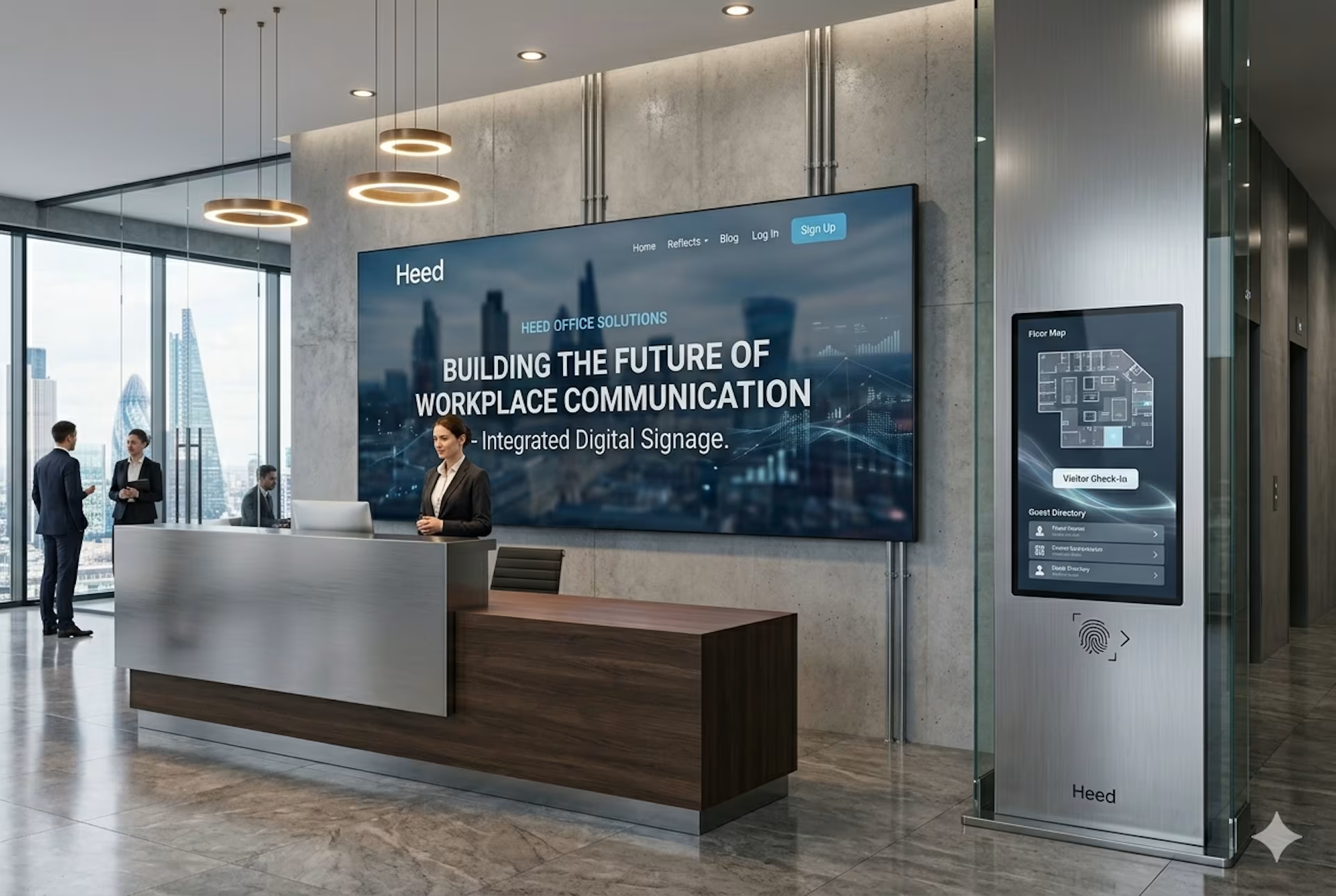
What Is Digital Signage in Internal Communications?
Digital signage refers to screens placed in physical environments such as offices, production floors, break rooms and reception areas and are used to display internal messages.
Unlike email or chat tools, digital signage is:
- Passive (no login required)
- Highly visible
- Ideal for reaching deskless or frontline employees
But visibility alone isn’t enough. The challenge is making signage targeted, controlled and meaningful, not just another stream of content.
Why Digital Signage Is Important
Internal communication has become more complex:
- Hybrid work is standard
- Frontline teams remain disconnected from traditional tools
- Message overload reduces attention
Digital signage solves a specific problem:
Reaching people where they actually are, not where you expect them to be.
When used properly, it helps:
- Reinforce critical messages
- Improve awareness of operational updates
- Support safety and compliance communication
- Reduce reliance on email for time-sensitive information
In organisations with mixed environments (on-premise systems, secure networks and cloud platforms) digital signage also plays a key role in ensuring communication reaches every part of the business consistently.
What Digital Signage Should (and Shouldn’t) Be Used For
If a message requires deep reading, signage is the wrong channel.
Best Practices for Using Digital Signage Effectively
1. Prioritise Clarity Over Volume
One of the biggest mistakes is trying to show too much.
Keep messages:
- Short
- Focused
- Easy to understand in 3–5 seconds
If everything is on the screen, nothing stands out.
2. Segment Messages by Location
Not every message is relevant to every screen.
For example:
- Warehouse screens → operational + safety updates
- Office screens → company announcements
- Reception areas → high-level messaging
Targeting improves relevance and attention.
With platforms like Heed, this targeting can extend beyond signage ensuring the same message is aligned across different channels and environments.
3. Treat Signage as a “Signal Channel,” Not a Content Feed
Digital signage should highlight important information, not replicate your intranet or email.
Think of it as:
A layer for high-priority communication, not general updates.
This is where many organisations struggle because without control, every message starts to feel equally important.
4. Combine Signage with Other Channels
Digital signage works best as part of a broader system.
For example:
- Signage → raises awareness
- Email or intranet → provides detail
- Internal comms platform → tracks acknowledgement
A unified approach ensures messages are not just broadcast but managed, tracked, and reinforced across channels.
5. Ensure Message Consistency Across Environments
In many organisations, communication is fragmented:
- One message on email
- Another on chat
- Something different on screens
This creates confusion.
Your signage should be part of a single communication framework, especially in environments that span:
- Secure networks
- On-premise infrastructure
- Cloud systems
Consistency is what turns communication into something reliable, not just visible.
6. Focus on High-Impact Moments
Digital signage is most effective when used at the right time:
- Shift changes
- Start/end of day
- During incidents or disruptions
Timing matters as much as content especially for operational teams.
7. Keep Content Fresh and Relevant
Outdated screens quickly become invisible.
Avoid:
- Static messages that stay up for weeks
- Irrelevant or expired updates
If employees stop trusting the content, they stop looking.
Common Mistakes to Avoid
1. Using signage as a dumping ground
Too many messages reduce impact.
2. Ignoring frontline needs
If your content is written for office employees, it won’t resonate on the ground.
3. No ownership or governance
Without clear ownership, screens become inconsistent and outdated.
4. Disconnected communication systems
When signage isn’t aligned with your wider internal communication tools, messages become fragmented and less effective.
Where Digital Signage Fits in a Modern Internal Comms Strategy
Digital signage is not a standalone solution.
It plays a specific role:
- High visibility
- Low friction
- Immediate awareness
But it needs to be supported by systems that provide:
- Targeting
- Control
- Accountability
- Cross-channel consistency
This is particularly important for organisations that need flexibility, whether deploying in the cloud, on-premise or across both.
Digital signage is one of the most effective ways to reach employees who are often missed by traditional communication channels.
But its value doesn’t come from the screens themselves.
It comes from:
- Sending the right message
- To the right people
- At the right time
- In the right format
When supported by a structured internal communication platform like Heed, digital signage becomes more than a display tool it becomes part of a controlled, reliable communication system.
And in a world of increasing noise, that clarity is what makes communication actually work.
Using Heed for Digital Signage
Heed is a powerful internal communications tool that organizations can use to create, manage and control their digital signage screens effortlessly.
With Heed, getting started is simple. The platform works with any screen type. There is no need to invest in new hardware and doesn’t require additional players or complicated cabling. This flexibility makes it ideal for organizations that already have screens in place and want a cost-effective, low-maintenance solution.
Heed is designed to be low touch for IT teams. Internal communications teams can create and publish messages directly to screens, leaving IT free to focus on other priorities. Content can be targeted, scheduled and tracked, ensuring messages reach the right audience at the right time, whether your deployment is on-premise, in the cloud or a hybrid setup.
Digital signage powered by Heed is a highly engaging channel for internal communications. It reinforces key messages, improves awareness and delivers important updates without distracting employees from their work.
By incorporating Heed into your internal communication strategy, organizations can create a resilient, connected culture where every employee stays informed no matter where they are.
To see how Heed works with digital signage, contact us or start a free trial today.
.svg)


.svg)






.avif)


.svg)
.svg)