
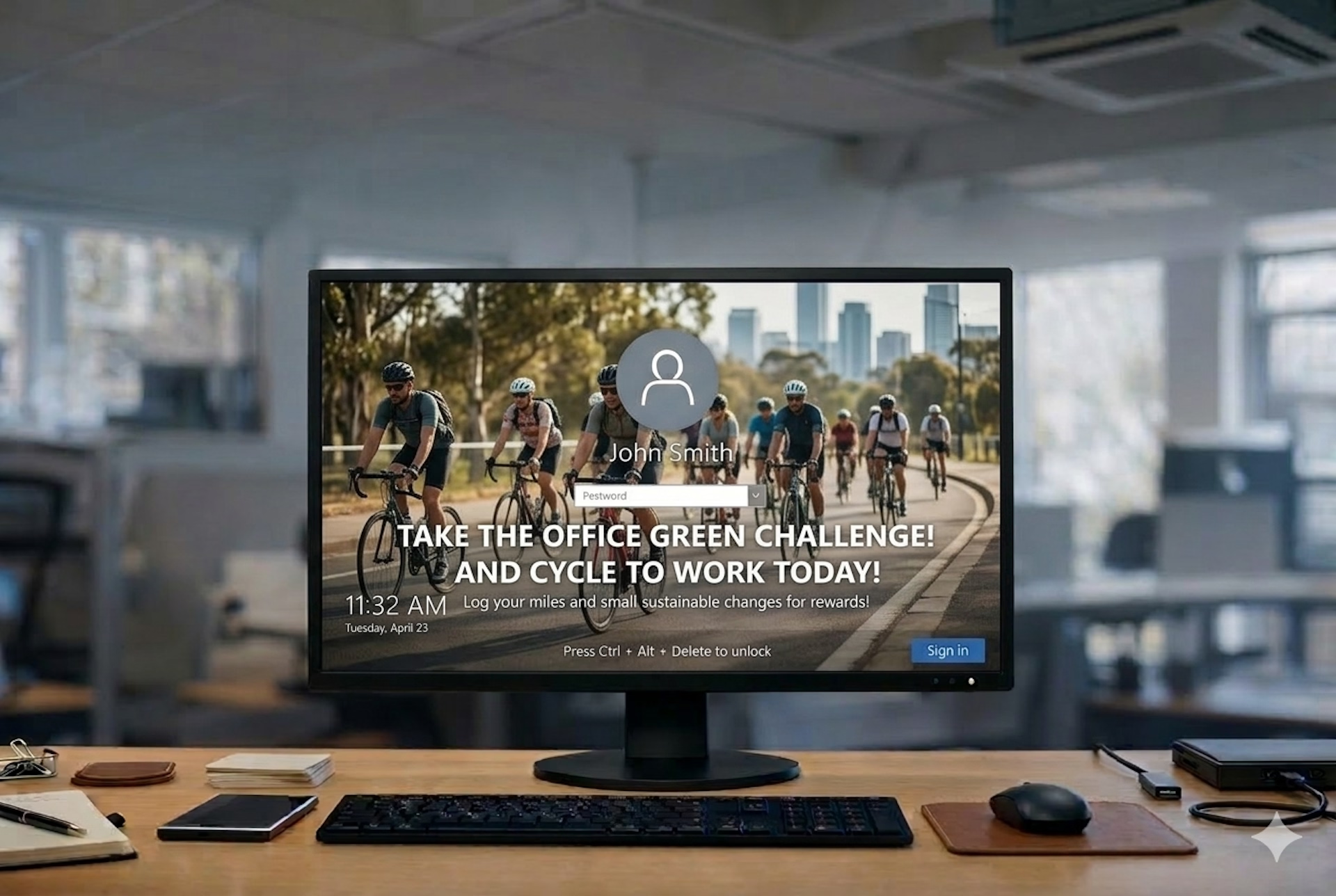
For organisations with large numbers of managed devices, Windows lock screens are more than just a security or branding mechanic, they are an opportunity to reach employees with high‑visibility internal messages. IT teams commonly use Windows lock screen Group Policy to standardise lock screens across devices, but this approach was designed for static system settings, not for dynamic internal communications.
As communication needs evolve, organisations are finding that Group Policy alone is inadequate for messaging that needs to be frequent, targeted, and easy to manage. In this article, we explore how Windows lock screen Group Policy works, why it falls short for communications teams, and how modern internal communication platforms, including Heed’s lock screen messaging, provide a more effective solution for enterprise needs.
At a Glance
Table of Contents
- What Windows Lock Screen Group Policy Does (and Why It Wasn’t Built for Messaging)
- Why Lock Screens Matter in Internal Communication
- The Limitations of Windows Lock Screen Group Policy for Communicators
- A Modern Alternative: Dynamic Corporate Lock Screen Messaging
- Lock Screens as Part of a Layered Desktop Communication Strategy
- Moving Beyond Static Lock Screens
- Frequently Asked Questions (FAQs)
What Windows Lock Screen Group Policy Does (and Why It Wasn’t Built for Messaging)
Windows Active Directory and Group Policy Objects (GPO) give IT administrators powerful tools to control device behaviour across an organisation. With Group Policy, IT can enforce consistent lock screen images, restrict settings, and ensure that every managed workstation applies the same configuration.
In practice, many organisations use Group Policy to deploy corporate lock screens displaying a static company image, a compliance notice, or simple instructions. From a device management perspective, this is a stable and enforceable way to ensure consistency.
However, the very design that makes Group Policy effective for system enforcement also limits its usefulness as a communication channel. Messages deployed through Group Policy are static. Once set, they remain unchanged until a new policy is created and pushed out by IT. For communications teams that need to share policy reminders, awareness campaigns or organisational updates, this lack of flexibility makes Windows lock screen Group Policy a poor fit for ongoing messaging.
Why Lock Screens Matter in Internal Communication
Before diving into alternatives, it’s worth understanding why lock screens are valuable in the first place. Unlike email, which users may ignore or postpone, the lock screen appears before login, giving organisations a moment of guaranteed visibility. When employees start their day, return from breaks, or resume work after a period of inactivity, the lock screen can act as a passive but consistent communication surface.
Used effectively, lock screens can reinforce important internal messages without overwhelming employees’ inboxes. Communication such as health and safety reminders, organisational values or timely policy updates benefit from this high‑visibility channel.
The challenge for many communications teams is not the value of the lock screen itself, but rather the restrictions imposed by configuration tools like Group Policy. These tools were never intended for content marketing, employee messaging or segmented campaigns.
The Limitations of Windows Lock Screen Group Policy for Communicators
Over time, three major limitations of Windows lock screen Group Policy become clear:
- Updates require IT intervention. Internal communications and HR teams cannot modify lock screen messages themselves. Every change must go through IT, adding operational overhead and reducing agility.
- Group Policy lock screens are static and manual, lacking scheduling and campaign control. Communications teams cannot schedule lock screen messages in advance or update them rapidly in response to emerging needs.
- Group Policy lacks targeting capability. Messages deployed via Group Policy apply broadly and cannot be tailored to departments, roles or locations. This is an increasingly important capability in modern internal communication strategies.
These constraints turn what could be a high‑impact communication channel into a cumbersome, IT‑dependent system that doesn’t serve the dynamic messaging needs of today’s organisations.
A Modern Alternative: Dynamic Corporate Lock Screen Messaging
Recognising these challenges, organisations are turning to dedicated internal communication platforms that treat lock screens as more than a system setting. Instead of relying on Windows lock screen Group Policy, these platforms allow communication teams to manage lock screen content through an intuitive interface.
With a purpose‑built solution like Heed’s corporate lock screen messaging, authorised users can create, schedule and update lock screen content without involving IT for every change. This empowers internal communications and HR teams to:
- Adapt messaging quickly in response to organisational needs
- Target lock screens by department, location or user role
- Schedule campaigns to coincide with events, releases or policy updates
- Maintain a consistent visual and informational experience across devices
This flexibility transforms the lock screen from a static image into an effective internal communication channel that supports broader organisational goals.
Lock Screens as Part of a Layered Desktop Communication Strategy
Lock screens are just one piece of the desktop communication puzzle. To maximise visibility and impact, forward‑looking organisations combine multiple desktop surfaces as part of an integrated communication strategy.
For example, lock screens can appear before an employee logs in, capturing attention at the start of the day. Desktop wallpapers can then reinforce key messages throughout the workday and screensavers can deliver reminders when devices become idle.
This layered approach ensures that employees encounter important messages at multiple touchpoints without interrupting their workflow. By linking lock screens, wallpapers, and screensavers together, organisations can build consistent and effective internal messaging campaigns.
To explore how these channels work together, check out:
- Heed’s corporate lock screen feature
- Heed’s corporate wallpaper feature
- Heed’s corporate screensaver feature
Moving Beyond Static Lock Screens
Windows lock screen Group Policy continues to play an important role in enforcing device configuration and system compliance. However, when the goal is internal communication rather than system enforcement, Group Policy’s static nature and IT dependency can slow teams down.
Organisations that embrace modern internal communication platforms gain the ability to manage lock screen messaging dynamically, target specific audiences, and respond quickly to organisational needs, all without relying on IT support or Group Policy changes.
Lock screens remain a highly visible and under‑utilised channel. The question for organisations today is no longer whether to use them, but how to use them effectively and that requires communication tools built for messaging, not just configuration.
Internal communication is evolving. As organisations strive to reach employees more effectively, traditional IT tools such as Windows lock screen Group Policy reveal their limitations. By adopting platforms designed for messaging, communication teams can unlock the full potential of lock screens and other desktop surfaces.
For organisations looking for a more agile, flexible, and powerful approach to internal communication, the Heed platform offers a compelling alternative enabling teams to manage corporate lock screens, wallpapers, and screensavers with ease and precision.

.svg)

.svg)








.svg)
.svg)