
An emergency alert system is a set of tools, processes and protocols that enable an organisation to deliver urgent messages to its workforce quickly and reliably. It covers everything from the technology used to send alerts to the rules governing who can trigger them, what they say, and who receives them.
The term is sometimes used interchangeably with mass notification system, though there is a practical distinction: a mass notification system describes the technology layer, while an emergency alert system encompasses the wider operational framework, including the decision criteria, escalation paths and verification steps that govern when and how alerts are sent.
In a workplace context, an effective emergency alert system must do three things. It must reach every relevant employee, regardless of where they are or what they are doing. It must do so quickly enough for the information to be actionable. And it must be credible, so that employees trust it and respond accordingly.
Email is the default communication channel for most organisations, but it is poorly suited to emergency notification. The core problem is that email is passive: it waits to be opened. During an emergency, that delay can matter significantly.
There are three specific failure modes that make email unreliable for emergency alerts.
Delivery latency. Email can be delayed by server queuing, spam filtering or recipient inboxes that are not actively monitored. A message sent at the moment of an incident may not arrive for several minutes.
Low visibility. An email arriving in a busy inbox competes with every other message the recipient has received that day. There is no guarantee it will be seen promptly.
No confirmation of receipt. Standard email delivery confirmation tells you the message reached a server, not that an employee opened and read it. In an emergency, the difference matters.
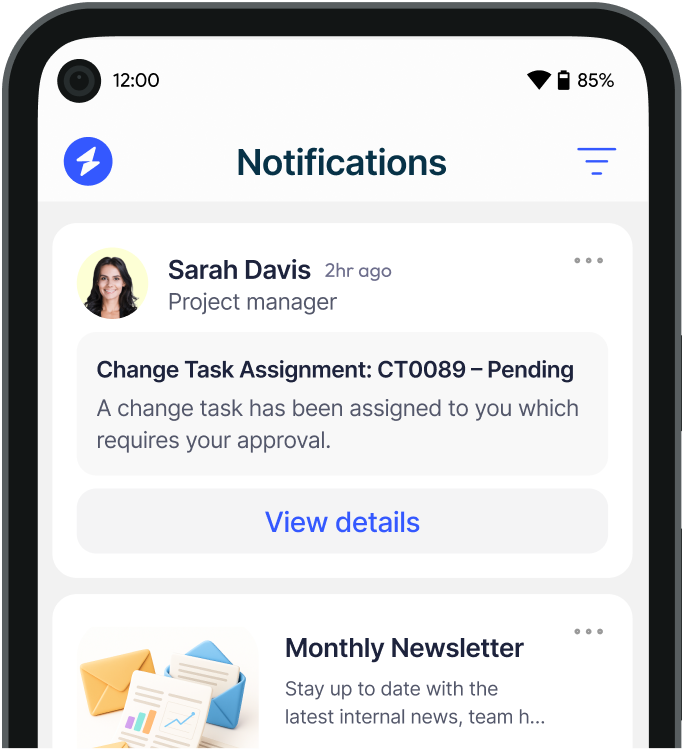
For situations where rapid, confirmed communication is required, organisations need channels that are active rather than passive: systems that push content directly to employees rather than waiting for them to check. Heed's Emergency Alert System delivers full-screen notifications directly to employee desktops, overriding whatever is on screen, so that critical messages cannot be missed.
Most organisations require more than one channel to achieve reliable coverage. Employees are not all in the same location, on the same device, or in a position to receive the same type of alert at any given moment. A robust system uses multiple channels in combination, with each channel suited to a specific scenario or employee group.
Full-screen desktop alerts push notifications directly to employee computers, appearing over all open applications. They are the most reliable channel for reaching office-based and remote desk workers because they do not require the employee to be actively checking email or any other application. Alerts can include text, images, video and action buttons, and delivery can be confirmed with acknowledgement tracking.
Desktop alerts are particularly effective for IT outages, cybersecurity incidents, and any situation where employees at a computer need to take immediate action or stop what they are doing.
SMS alerts reach employees on their mobile phones, making them effective for situations where staff may be away from their desks or where a building evacuation means desktop access is unavailable. Because SMS does not require an internet connection, it maintains reach even when internal systems are disrupted. Heed's SMS notifications work alongside desktop alerts to provide multi-channel coverage across both office and field-based employees.
Voice notifications deliver spoken messages to employees, either via phone calls or connected speaker systems. They are appropriate for employees who may not have immediate access to screens, including warehouse, manufacturing and site-based workers.
For shared spaces and common areas where employees may not be at individual workstations, digital signage provides a visible broadcast channel that does not depend on personal devices.
Where a situation requires more than text, video alerts allow leadership or communications teams to deliver a recorded message with greater clarity and authority than written copy alone.
Not every situation warrants every channel. Triggering all channels simultaneously for a routine update will train employees to ignore alerts, which undermines the system's credibility for genuine emergencies. The right approach is a tiered channel strategy matched to incident severity.
Fire, active threat, building evacuation, medical emergency. Use all available channels simultaneously: full-screen desktop alert, SMS, voice, and digital signage. Require acknowledgement. Escalate automatically if acknowledgement is not received within a defined timeframe.
Major IT outage, cybersecurity incident, severe weather closure, site lockdown. Use desktop alert and SMS. Acknowledgement recommended. Update cadence defined in advance.
System maintenance with service impact, building access restrictions, urgent policy change. Desktop alert or SMS alone, depending on employee location. No acknowledgement required.
This tiered approach preserves the credibility of Tier 1 alerts, which depends on employees understanding that a full-system alert always means something serious. For more on how to structure communication across crisis scenarios, see the Crisis Communication Plan guide.
Sending an alert is not the same as confirming that employees have received and understood it. Acknowledgement tracking captures which employees have seen and responded to an alert, enabling communications teams to identify gaps and follow up with those who have not responded. In regulated industries and organisations with duty-of-care obligations, this confirmation record can also be important for post-incident reporting.
Not all alerts need to reach all employees. A fire in one building should alert occupants of that building, not the entire organisation. Targeting by role, department, location or Active Directory group reduces noise and improves relevance, which in turn improves response rates. Heed integrates with Active Directory and SSO, allowing organisations to target alerts based on their existing directory structure without maintaining a separate contact list.
During an emergency, the time spent composing a message is time lost. Pre-built alert templates, reviewed and approved in advance, allow communicators to trigger accurate, consistent messages within seconds of an incident being declared. Templates should cover the most likely scenarios: fire evacuation, IT outage, cybersecurity incident, medical emergency, and severe weather.
After any significant incident, organisations need to review what was communicated, when, and to whom. A system that logs all alert activity, including send time, delivery confirmation, acknowledgement rates and follow-up messages, supports post-incident review, regulatory compliance and continuous improvement.
The requirements for emergency alert capability vary by sector, but several industries face specific obligations that shape how alert systems are designed and operated.
Healthcare. NHS trusts and private healthcare providers operate under NHS England emergency preparedness frameworks, which require documented major incident communication procedures. For an overview of how emergency communication works in a clinical setting, see the Hospital Emergency Codes guide.
Financial services. Firms regulated by the FCA and PRA are required to maintain business continuity arrangements that include staff communication during operational disruptions. Alert systems must support incident response and be capable of notifying relevant staff within defined timeframes.
Government and public sector. Government bodies and local authorities operate under Civil Contingencies Act obligations, requiring documented emergency plans that include internal staff notification procedures.
Construction and manufacturing. Health and safety legislation under the Health and Safety at Work Act 1974 requires employers to have procedures for serious and imminent danger. On-site emergency alert capability, covering both office and site-based workers, is part of meeting that obligation. See the Workplace Safety Topics guide for more on safety communication requirements.
For organisations in these sectors, an on-premises deployment model can be important: if the alert system depends on cloud connectivity and that connectivity is disrupted during the incident, the system may fail at exactly the moment it is needed. Heed supports true on-premises deployment, meaning the alert infrastructure runs within the organisation's own environment and is not dependent on external network access.
An emergency alert system handles the notification layer: getting the right message to the right people quickly. Crisis communication is the broader discipline covering what those messages say, who is authorised to send them, how the organisation communicates with external stakeholders, and how it manages the situation over time.
The two are closely related but distinct. An emergency alert system without a crisis communication plan produces fast, potentially inconsistent messages. A crisis communication plan without a reliable alert system produces well-crafted messages that may not reach employees in time.
For guidance on the planning layer, see the Crisis Communication Plan guide. For operational incident response, see the Incident Response Communication guide.
Heed's Emergency Alert System is designed for organisations that need reliable, fast and confirmed delivery to a large employee population. Key capabilities include full-screen desktop alerts that override all open applications, SMS notifications for employees away from their desks, panic button functionality for immediate alert activation, acknowledgement tracking with delivery reporting, and Active Directory and SSO integration for role and location-based targeting.
Heed supports true on-premises deployment as well as regional cloud options, making it suitable for financial services, healthcare, government and other sectors with strict data governance requirements. Heed is ISO 27001 certified. Book a demo to see how it handles emergency notification in practice, or explore pricing.
See how Heed streamlines internal communication across desktop, mobile, and shared screens - so every message gets noticed.
We’ll walk you through creating, targeting, and tracking notifications in real time, tailored to your organisation’s goals.
Schedule a Demo
See how Heed works across your channels, sites and shifts, and get answers to the questions specific to your industry and team size.
Schedule a Demo




Talk to us about keeping your employees informed, engaged and inspired - book a call today!
Book a Call
Proudly connecting teams worldwide, enhancing communication, and boosting employee engagement for a unified workforce.
.svg)
.svg)
© Heed 2026 - All Rights Reserved


.svg)